Halaman ini hanya untuk tujuan informasi. Layanan dan fitur tertentu mungkin tidak tersedia di yurisdiksi Anda.

Complete Beginner’s Guide to Buying and Selling Crypto on OKX P2P Across Africa

1. Create and Verify Your Account (KYC)

[OKX app home screen showing Sign Up or Log In button]
[Screenshot 2: Identity Verification screen with document upload options]

Steps:

  1. Download the OKX app.

  2. Create an account using email or phone.

  3. Go to Profile.

  4. Tap Identity Verification.

  5. Upload your National ID, Passport, or Driver’s License.

  6. Take a selfie and submit.

2. Add Your Payment Method

[Screenshot 3: Profile menu with Payment Methods visible]
[Screenshot 4: Add Payment Method page (mobile money, bank transfer, fintech options)]

Steps:

  1. Tap Profile.

  2. Select Payment Methods.

  3. Tap Add Payment Method.

  4. Choose your preferred payment option.

  5. Enter accurate details matching your KYC name.

3. How to Buy Crypto on OKX (Express Buy and P2P Buy)

Express Buy

[Screenshot 5: Buy Crypto page with Express highlighted]
[Screenshot 7: Payment confirmation page showing seller details] [Image]

Steps:

  1. Tap Buy Crypto.

  2. Select Express.

  3. Pick your local currency.

  4. Choose the crypto you want.

  5. Enter amount.

  6. Pay seller.

  7. Tap I Have Paid.

  8. Wait for crypto release.

P2P Buy

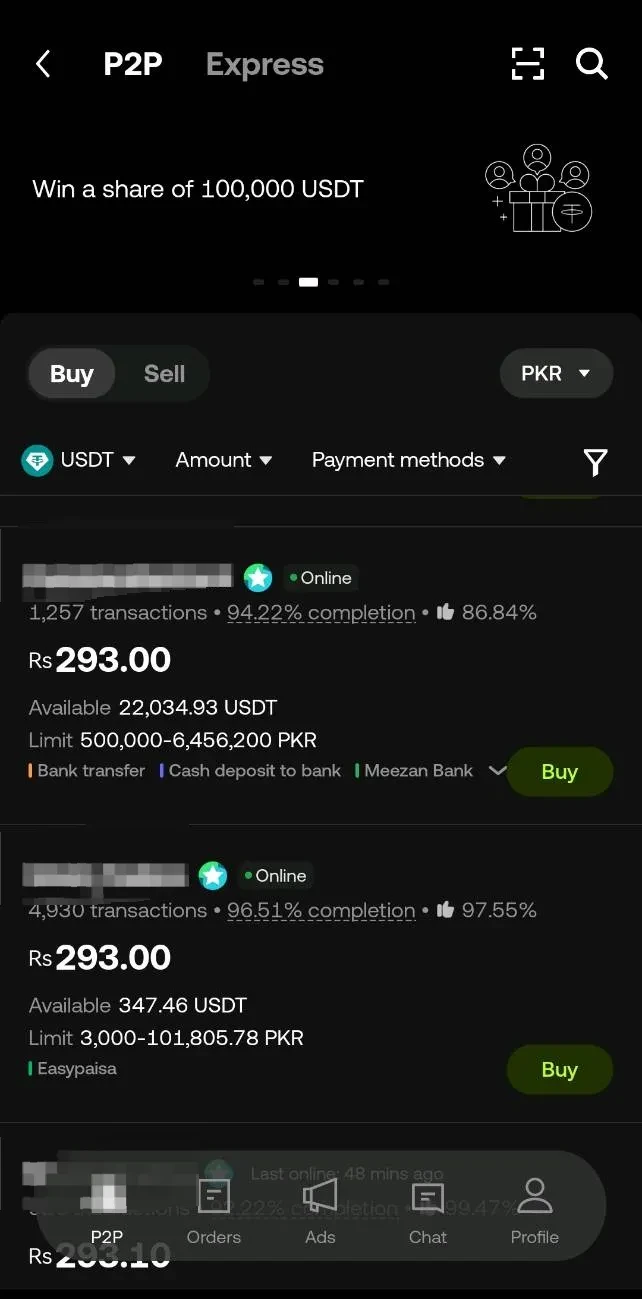
[Screenshot 8: P2P Trading homepage with Buy selected]
[Screenshot 10: Order page showing merchant details and payment timer]

Steps:

  1. Go to Trade.

  2. Select P2P Trading.

  3. Tap Buy.

  4. Choose your currency.

  5. Pick the crypto.

  6. Compare sellers.

  7. Tap Buy.

  8. Pay seller.

  9. Upload proof of payment.

  10. Tap I Have Paid.

  11. Receive crypto.

4. How to Sell Crypto on OKX (Express Sell and P2P Sell)

Express Sell

[Screenshot 11: Sell Crypto page with Express selected]
[Screenshot 12: Order summary showing payout currency and payment method] [Image]

Steps:

  1. Tap Sell Crypto.

  2. Select Express.

  3. Choose currency.

  4. Select crypto.

  5. Enter amount.

  6. Wait for buyer payment.

  7. Crypto releases automatically.

P2P Sell

[Screenshot 13: Transfer page to Funding Account]
[Screenshot 14: P2P Sell page with buyer list]
[Screenshot 15: Order page with Release Crypto button]

Steps:

  1. Move crypto to Funding Account.

  2. Go to P2P Trading.

  3. Tap Sell.

  4. Choose currency.

  5. Select crypto.

  6. Review buyers.

  7. Tap Sell.

  8. Wait for payment.

  9. Confirm payment has arrived.

  10. Tap Release Crypto.

5. Safety Tips for African P2P Users

Tips:

  1. Confirm payment before releasing crypto.

  2. Do not trust screenshots.

  3. Log into bank always and confirm receipt of payment in account

  4. Make payment and confirm payment has been made within window before the time cruns out

  5. Do not accept phone calls instructions outside of the OKX app

  6. Use OKX chat only.

  7. Avoid low-rated traders, consider reviews, completion rate and number of trades completed

  8. Open appeals if needed.

  9. Start small if new.

6. Why OKX Works Well for Africans

  1. Zero P2P fees.

  2. Fast mobile money payments.

  3. Large merchant network.

  4. Strong security(Check out our Proof of Reserves).

  5. Easy for beginners.

Bottom Line

  1. Complete KYC.

  2. Add payment method.

  3. Use Express for speed.

  4. Use P2P for better prices.

  5. Works for all African currencies.

Penafian
Konten ini hanya disediakan untuk tujuan informasi dan mungkin mencakup produk yang tidak tersedia di wilayah Anda. Konten ini juga tidak dimaksudkan untuk memberikan (i) nasihat atau rekomendasi investasi; (ii) penawaran atau ajakan untuk membeli, menjual, ataupun memiliki kripto/aset digital, atau (iii) nasihat keuangan, akuntansi, hukum, atau pajak. Kepemilikan kripto/aset digital, termasuk stablecoin, melibatkan risiko yang tinggi dan dapat berfluktuasi dengan sangat ekstrem. Pertimbangkan dengan cermat apakah melakukan trading atau memiliki kripto/aset digital adalah keputusan yang sesuai dengan kondisi finansial Anda. Jika ada pertanyaan mengenai keadaan khusus Anda, silakan berkonsultasi dengan ahli hukum/pajak/investasi Anda. Informasi (termasuk data pasar dan informasi statistik, jika ada) yang muncul di postingan ini hanya untuk tujuan informasi umum. Meskipun data dan grafik ini sudah disiapkan dengan hati-hati, tidak ada tanggung jawab atau kewajiban yang diterima atas kesalahan fakta atau kelalaian yang mungkin terdapat di sini.

© 2025 OKX. Anda boleh memproduksi ulang atau mendistribusikan artikel ini secara keseluruhan atau menggunakan kutipan 100 kata atau kurang untuk tujuan nonkomersial. Setiap reproduksi atau distribusi dari seluruh artikel juga harus disertai pernyataan jelas: “Artikel ini © 2025 OKX dan digunakan dengan izin.“ Petikan yang diizinkan harus mengutip nama artikel dan menyertakan atribusi, misalnya “Nama Artikel, [nama penulis jika ada], © 2025 OKX.“ Beberapa konten mungkin dibuat atau dibantu oleh alat kecerdasan buatan (AI). Tidak ada karya turunan atau penggunaan lain dari artikel ini yang diizinkan.

Artikel Terkait

Lihat Selengkapnya
how to buy crypto guide

How to Contact OKX Support?

If you need help with your OKX account or have a question about crypto trading, knowing how to contact OKX support is crucial. Scams and unofficial ch
12 Jan 2026
how to buy crypto guide

What is OKX Perpetual Futures?

Perpetual futures have changed the crypto landscape, allowing traders to leverage price moves without worrying about contract expiry—OKX perpetual fut
8 Jan 2026
how to buy crypto guide

What is OKX Earn: How to Earn Passive Crypto Rewards

The race to earn passive income from digital assets is hotter than ever, and **OKX Earn** is leading the way for both beginners and seasoned crypto ho
8 Jan 2026
how to buy crypto guide

How to Use OKX?

OKX is one of the world's fastest-growing crypto exchanges. Whether you're exploring crypto for the first time or searching for advanced trading and a
8 Jan 2026
swing-trade

Swing trade descomplicado: o que é, como funciona, vantagens e cuidados ao operar

15 Des 2025
PK P2P

Complete Beginner’s Guide to Buying and Selling Crypto on OKX P2P Across Pakistan

1. Create and Verify Your Account (KYC) Steps: Download the OKX app. Create an account using email or phone. Go to Profile. Tap Identity Verification
15 Des 2025
Pemula
Lihat Selengkapnya